Friday, August 19, 2011

TOGAF Day 4 (Final)

Same rigorous sessions. Lunch was a drab.

I so much hoped that my team wins the Most Innovative Name competition with Name Caravan Global with this Banner.

John decided Team Ventura the winner. The name kind of remind me of the Ventura and does not directly connote Courier services that formed the core of the Case Studies. Anyway, the prizes were Mars chocolate bars and Team Ventura was nice enough to share it.

marschocolate1

Anyway, in a couple of weeks after the assessment of the Workbook, I will be TOGAF Certified.

Thursday, August 18, 2011

TOGAF Day 3

Today we were able to get as far as the F stage of the TOGAF Architecture Development Method.

At this point I as already suffering a paralysis from the Information Overload. Just could not take much more and was distracted for most part of the day.

I still tried to learn a bit more and participated in the group task. I

Each of the teams were able to present their developed Artifacts. Quite insightful. We also had a group picture taken.

DSC_0170

The group later went out for drinks at Bungalows.

Wednesday, August 17, 2011

TOGAF Day 2

Day 2 is more puzzling as they sessions got more intense and so much more terms to note and models to understand. For a moment, I was swarmed but need to all I can not to get confused.

Filled with renewed respect for the Boss I work with at MTN as he has been practicing this all these over the years and most people unable to figure out his act.

Amidst the busy session. I was still able to take a couple of pictures for memory sake


Tuesday, August 16, 2011

TOGAF Day 1

Though I still continue in the IASA Mentoring program. I had to pause for a few days to attain a TOGAF Certification.

Training facilitated by John Polgreen from Architecting the Enterprise. I have had a bit of experience with Frameworks having worked on eTOM and NGOSS over the last couple of years so TOGAF is not pretty new but I have a bit of issues understanding the Architectural models. I hoped this training would help address that.

I spent two hours last night reading the TOGAF 9e material which seems simple at the beginning but quickly turned cryptic after a couple of pages.

The training today mentioned some of the stuff I was trying to read last night and give me better confidence in understanding the terms. I will give reading the material another shot later tonight.

A little surprised when it was announced we registered for the TOGAF 8  and not TOGAF 9 but John quickly clarified that there is a makeup exam specific to moving to TOGAF 9 from 8.

I am not sure how much of the Architectural Models we would be able to handle in the four day training but I hoped we can do all. On the brighter side, I would have bagged the TOGAF Cert title by the end of the week.

Thursday, August 04, 2011

Journey to EA: IASA Mentoring Day 4


Another Mentor just accepted  to indulge me. He is Lalo Steinmann. He has experience in Architecture Strategy and currently working on Public Sector Cloud Strategy for Microsoft.

So far I have been able to set my learning goals with Lalo Steinmann. A little similar to Scott’s goals but more on Strategy which is Lalo’s obviously core strength.

I mailed Scott to request permission to pass as I got a lot to get ready for tomorrow. Another key reason of rescheduling our session for today is that I am beginning to suffer from information overload and need time to assimilate the little I have learnt.

Wednesday, August 03, 2011

Journey to EA: IASA Mentoring Day 3


Spent a bit time today reading about Business Architecture but then I got an interview to prepare for and still got a lot of the companies products to learn about.

Buzzed Scott on GTalk around 7.30pm GMT +1. Just before then, I had a thought not to contact him today to give myself time to prepare better for his sessions. I can’t be seen asking dumb questions. This will mean having to mail him to inform him not to bother planning for me today and that changed my mind. I still got yesterday’s CITA-P Skill Assessment feedback to get from him.

During the chat, he advices that our sessions will be focused on Business and Human Dynamics (two key areas I was clearly weak in the Assessment). He advice I get a few books

  • Portable MBA Series
  • The Path: Creating Your Mission Statement for Work and Life
  • Subscribe to Fortune Magazine or any other local Business magazines

He excuse to dash for a meeting and we done for the day. I still pray silently that Grady Booch to accept me as mentee.

The number of Mentees rose to 19.

Tuesday, August 02, 2011

Journey to EA: IASA Mentoring Day 2

After reading the IASA Mentee handbook just before bed the previous night. I realised a key Goal visibly missing in my goals set on day 1 which is to
Develop and build a healthy/cordial relationship with my mentor
On getting to work, I immediately responded to Scott's and composed another mail on my ipad about myself with a picture of my family and I. Discovered later through Scott that all test after the picture got chuncked off and only a portion of the mail got delivered (still cannot explain what happened).

I left a message for Scott on the message board to buzz when he's available. He replied a few minutes later requesting for my resume and a CITA-P Skill Assessment form. Fortunately, I had recent resume handy.

The Skill Assessment was quite an eye-opener as I could quickly connect the dots of a lot of my missing skills. My summary score (hope I was objective in the scoring) is as shown below. Score based on 1-4 (mind you there are 10 proficiency levels).

Business Technology Strategy 1
IT Environment 2.2
Design Skills 2.2
Human Dynamics 2
Quality Attributes 2.1
Software Architecture 2.2
Infrastructure Architecture 2

We later had our first phone conversation. He was soft spoken and assuring. The discussion surrounds on the role of EA and it's report line.

Paul Preiss declined my request for Mentoring on a good ground that I had already been accepted by a Mentor and like Scott will only want to a handle a Single Mentee.

The numbe of mentee regsisted grew to 18। I realized there could be room for more mentees so I invited a few friends to come join.

Grady Booch just joined the list of Mentor now.

Monday, August 01, 2011

Journey to EA: IASA Mentoring Day 1

Waking up this morning, I was so pumped about my IASA Mentoring program to commence today. A little downcast not being able to find any information yet in my email box; a situation exacerbated by my excitement. Last week's orientation Webinar was a blast. It was very informative and assuring of the value in this program.

After a long wait due to the time zone difference, Paul Preiss sent an invite and I quickly update profile and commence soliciting for Mentors. There are about 20 Mentors available yet (Grady Booch that has recently joined the Mentor Program was clearly missing and may appear soon. ), I expect there are more coming soon. I was able to contact 8 seasoned EAs with vast experience to accept me as a Mentee.

I noticed quite a good number of the 20s currently work with Microsoft or has served with Microsoft in one capacity or the other. Surprisingly, they are the same guys I have tried to find earlier in the year through the MVP program to mentor as EA. I must have been using the wrong machinery for such quest. Glad I have that now and intend to maximize their use if they let me.

Awesome, Scott Whitmire just accepted to be my mentor. He is a Enterprise Architect with T-Mobile. I expect to learn a great deal from him considering the industry we currently both share in common.

To set my EA Goals
- Learn about Role of EA in the Enterprise
- How EA applies in the Telcoms
- How to Formulate an EA Strategy & Sell strategy to Business
- Using EA tools
- still thinking....

Wednesday, March 09, 2011

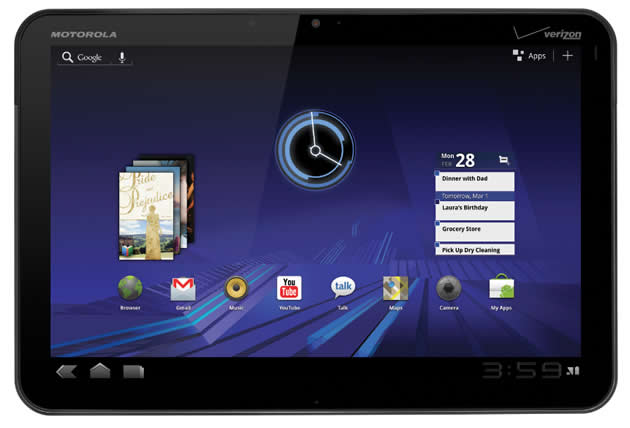
Motorola Xoom Review


Got a Motorola Xoom from BestBuy but contrary to my expectation of making it my beloved tablet for a long time, I had to return it in a couple of days. I do see a lot of tweets from people claiming it's a great device and using video experiences as evidence and think it nice to share my own experience of the device.

Disclaimer: This is not to prevent any buyer from going ahead with their wish but for them to know exactly what they are paying so much for.

Likes
I like the feel of the device and the wide screen size that it offers. The power button location was well thought of and it fits nicely with my left index finger. Email application quite cool too and the concept of shifting view like a rotating cube I find appealing. Device battery life is great as I used this for hours without having to charge it. The video app is very good and play video nicely well.

Dislikes
The OS (Android HoneyComb) is still very buggy and you do not need to be a tech savvy user to break it. It's really not that functional yet due to the low number of available applications. I went ahead for sake of testing and installed the Asphalt game and some other apps. The game was rendered improperly, though works but the on-screen button will not work unless on some other location on the screen. GTalk app does not allow voice chat yet. Firing up the browser and navigating to Google, I noticed a twitch at the left side of the view causing improper rendering of the page. All other sites I was able to use it with seems fine though. Android market apps restrict the user to only landscape view.

The two segment at the back does not look all that nice but that's a little trivial. USB charging is not supported and makes use of Motorola charging port, though device has a micros USB port which is only for data transfer. The Motorola Xoom will also not recognize micro SD card yet, I understand Motorola is working on a fix as I called BestBuy concerning this. The volume buttons when depressed breaks the audio for a little while hindering smooth audio while increasing or decreasing volume. Also pinch to zoom does not work everywhere. The on-screen keyboard and key sizes does not make for great typing along with the form factor. Typing on this device is not smooth.

Conclusive View
I really do think Motorola and maybe Google rushed this device to the market and they should be nice enough to admit that. Paying so much for that device for someone with no access to credit, it's really was annoying that usability of the device sucks so badly for me that I had to return it before it starts taking scratches. The device have potentials no doubt but a lot of work still needs to be done on the overall experience.

The Xoom being a flagship android tablet has not been able to overtake the Samsung Galaxy tab with which runs a better tested OS (Froyo) and most android apps runs smoothly on it.

Tuesday, November 02, 2010

My HTC Desire Review


Much have been said about the HTC Desire since it's release in February, 2010. Reviewers has showered quite so much accolades on the device that I hardly could find any thumb-down review of it.

In all, honesty, it's a beautiful device, and with the Android 2.2 (Froyo) doing great on the device you'd think no device maker could ever get it wrong.

I recently made a painful switch from the iPhone 3GS to the HTC Desire. Painful not because the HTC Desire is inferior but because I have had the iPhone 3GS customized so much that I find it hard to separate from it.

As a phone, the HTC Desire is way lot better and as a PDA, it does come neck to neck with the iPhone 3GS. Comparison with iPhone 4 is an entirely different stuff and will not want to go into that as I am a bit biased with the Gyroscope addition from Apple and Retina display is insanely out of this world. I am particularly also happy for being rid of the Jobs/Apple's control on what you can and can do with the device and having to beg @geohot for a new hack anytime an update comes available.

Despite the HTC Desire being better, I missed quite some features from my iPhone 3GS and also some not initial pain points from HTC itself.

1. Memory
The HTC Desire runs on 512MB on-phone memory and ships with 4GB micro SD card upgradeable to 32GB.
This sounds cool on a review spec but sucks so much in reality. I had so much apps running on previous 3GS. I got apps doing way so many stuffs. A lot of the apps on the Android market I will say discriminates running on the SD card. They all prefer to run on the on-Phone memory. Only six apps (Blogger droid, Goggles, Opera Mini, Bible, ConnectBot and FxCamera) out of the little that I installed are disciplined enough to move to the SD memory so right now I am running out of phone memory and got services crashing due to this but got lots of space on the SD card.

2. Touch Screen
Apple seems to lead in this area and I wonder why the other device maker still struggle with smooth touch experience. I find the HTC Desire lagging a little in touch sensitivity.

3. Orientation Transition
Screen orientation transition on the HTC Desire not smooth. It's like a refined transition of my old HTC Tytn II screen transition. The iPhone gives better transition as you can see the screen rotating as you turn the phone but in the case of the Desire, you simply see a switch and no transition.

4. Message Alert
A user cannot separate email alert from message alert. All got bound under the name of notification alert. I currently use "Excuse me boss, you got a text message!" so I do get alerted for messages even when I got email or Fring Notification.

5. Keyboard
The HTC Desire onscreen keypads looks nice and the little vibration from the phone helps gives it's usage a close to reality experience but lags way behind the iphone keypads in terms of accuracy. I have so much typos in my tweets and emails than I have even in the stylus days.
Do check my recent tweets with HTC desire signatures to confirm this.

6. Speech-to-Text
I have heard much praises even from Friends about the Android Speech-To-Text feature but my experience of it is not convincing. I do email and SMSs while driving and need this to work great but not yet.

7. Do I trust HTC?
I got complaints from earlier HTC Android device owners on the delay from HTC anytime there's a new Android update and the risk of HTC not releasing an update refresh for older Android devices. I will expect the HTC to be able to run future Android updates but if HTC refuses to release an update for it, then I am back to the seemingly Apple spot.

Other Little Quirks
- Sometimes open emails only to reply same email and a message stating can't find recipient
- Sometimes click on a message but another message got loaded
- Sometimes delete messages, got confirmation it's done but message still on phone. Works when you redo the task
- No unified email experience
- No on-device screenshot feature
- I am a gamer - iPhone has better games

Conclusion
I can actually live with most of the issues above except the memory issue which seems to get a lot under my skin. The HTC is a lovely device with better Exchange Integration, awesome email and MMS capability (the iPhone sucks with MMS), radio capability, live wallpapers, true multitasking and better voice call clarity, Sense UI and Android Scene features.

Monday, July 26, 2010

Unboxing New XBox 360 Slim

After weeks of checking Best Buy stores all around Houston for availability of the new XBox 360 S, was finally able buy one. Shipping down to Nigeria took a bit longer too but alas I have it here at last.

DSC05254.jpg


I would have loved it shipped with MS Kinect but that could be purchased later. THe pack include, the XBox Console, ever humongous power pack (though much smaller that the one I used to have), a single wireless controller with 2 batteries, and AV cable (this is quite disappointing as I would expect HDMI cable instead).

DSC05255.jpg

DSC05256.jpg


With that said, I'd like to record a personal review.

To My Review
Seeing the black glossy device on my shelf was a welcome change to my former XBox 360 Arcade. Packaging was cool too.

Though Microsoft claimed the XBox 360 S was much quiet that the former, I still cannot help but get a bit mad with the humming sound coming out of the device.

The device buttons require light touch that even a mosquito bumping into the switch can flick on the device. Not particularly sure this may be in my wish-list while using the old XBox 360 but I consider this cool.

I use a NTSC TV in a region with lots of PAL devices so I love that it's got HDMI slot which is my main reason for changing to the new device. Just why did it not get shipped with a cable.

Most annoying is that I saw an immediate need to want my games and achievements on the old device copied to the new XBox 360. Microsoft did not have a zero cost pocket friendly solution to this simple need but for a purchase of $15 copy kit. Right now, I may have to replay my seven XBox titles. Kinda pathetic.

Before now, I have read quite a few review of this new hot-selling device but never noticed any complaint on the incompatibility of the memory card on the old device. I had four of this which automatically became useless and will just have to give these away to whosoever I sold the device to.

DSC05258.jpg


I love the new 250GB (would prefer more) but not finding making my former 120GB unusable pleasant. I bought this separately and having to do away with it hurts.

My recommendation is if you already had the former XBox 360, there is little to gain buying the new device but if you do not, this is a console you'd love to Jam a cool Xbox title on.

Saturday, February 20, 2010

MVP Summit 2010 Ends

The day began like any other morning and MVP turnout at breakfast was quite scanty. A few MVPs had left at the early hours of the morning while the others are still in bed after a long night at the Garage, downtown Seattle.

DSC04971.jpg


Keynote was at 9am with Nestor Portilo and his supporting entertainers on Stage. Quite some new NDA stuff which I consider cool. A lot of new eye-opener to the Bing Paradigm. I enjoy that session most though

DSC04985.jpg


Find more picture of the summit at My Picasa

Summit is now over and all I got left are the side sessions and a party tonight with Nerd Dinner.

Wednesday, February 17, 2010

MVP Summit Day 1

Arrived at Bellevue yesterday aternoon like a few other MVPs but not much activities though. My MVP lead (Ruari Plint) was benevolent enough to take all MEA MVPs out to the PumpHouse for dinner.

DSC04856.JPG


Day One of the summit begin with MVP registration and the side sessions commenced 12pm till 3.30pm.

All MVPs were looking forward to the Keynote address with Nestor Portillo and Toby Richard.

DSC04856.JPG


Got my Team Canada Hockey shirt too
DSC04856.JPG


Thanks Mitch...

Later went rookie bowling at the Lucky Strike Lanes just across the sky bridge.
DSC04856.JPG

Wednesday, February 03, 2010

Windows 7 on MacBook


Having a MacBook is something I am quite proud about but then I am not ready to give-up the Windows that I have known all my life. I have been using Windows 7 for over a year and what a cool OS I find it to be. Even though the Mac OS X Snow Leopard is cool too. I still want my Windows running on it. What's the use of having an Intel-based processor if I can't run Windows as well. Even Linus if I choose to.

I installed Windows 7 on my BootCamp drive and it was smooth though Apple recommends on Windows XP and Windows Vista. After installation, I installed the bootcamp tools supplied by Apple. All my devices seems to work fine. One by one I checked them and tick them off in my head: Wifi- check, bluetooth -check ....

I decided to look a bit more under the hood. Fired up Device Manager and alas, two errored devices. Apple USB Ethernet and Co-Processor does not seem to have the right drivers. Fumbled around for hours without success to getting them to work. I can't live without an ethernet port even if the co-processor does not seem to matter initially; some computation will have to suffer.

devman.PNG


Come Google to the rescue (thanks for not censoring anymore in China). Found out some other people have encountered this and no clear-cut solution until I came across a post by tnkgrl Mobile. In the post, a link to the driver is provided.

The Windows XP driver provided works like magic.

Tuesday, January 12, 2010

Things I hate about my Mac

The Mac is a very good machine. I am like the Paul of the Mac machine formerly Saul of PC - prosecuting the Mac System and stoning Mac users (not literarily) if you happen to have read the bible at all or heard from those that have read (like I did).

I find the Mac incomparable with the PC. The Spec of My Mac Book Air is about the Spec of my previously owned PCs I bought 2 years ago but much faster than my last PC with far better Spec. Believe me, you won't be comparing "Apple" to "Apple" comparing the Mac and PC.

I could hear someone whispering "That's cos u were running Windows". Wrong!! I have Windows 7 running on my Mac too and it's Blazing fast.

My conclusion is that I will like to believe this is due to some sluggish defect in the PC design.

Spoken by a recent Mac user ....

However, I hate a few stuffs about my Mac.

1. My MacBook Air has just one USB slot. This is no problem with Mac but on the other hand it is. I could have chosen other model other than the Air you would say, but then I had the option of a USB hub you would also suggest. Wrong! The Mac work's better with powered USB so I could not have my network running and still have my drive on. Solution - Buy a powered USB hub - $35

2. NTFS drives are loaded as readonly. Just wondered why Apply had to make this the default option in Mac. OS X reads NTFS pretty well and should also write if you ask me.
Solution - Include UUID in /etc/fstab file (tiresome and often require restart) or buy a NTFS Manager like Paragon NTFS for mac $40

3. Mac is too pretty. I find it hard to imagine the future of my Mac with faded keyboards and trackpads. Think I need the Wireless keyboard and mouse - mouse I say, I want the Magic Mouse $70+$70 = $140

4. Can't get Mail to work with Exchange Server used in most enterprise. Solution - Buy Mac Entourage bundled with Microsoft Office for Mac. $150

5. Miss Visual Studio So bad. Wish their a version of that the works on the Mac. Mac offers XCode, plus I got Eclipse working (even though they confused on Carbon or Cocoa) and MonoDevelop works great too. Solution is buy CrossOver or Install Windows 7 on your bootcamp and run from VM Fusion with Unity Mode. - average cost - $70 (cross over) + $80 /2 = $75

6. Can't upgrade my MacBook Air RAM beyond 2GB as it has no drive-bays. The RAM is soldered unto the board. I run quite a lot of VMs and 2GB would not be enough. These days my system locks up when I boot up my bootcamp Windows from VM fusion. Solution is buy a Mac Mini and moves task to it. $600

At the end of the day, I have $1040 worth of hatred for my Mac but despite that, I still LOVE IT...

Monday, January 11, 2010

Fixing Ghosted File

Just a few weeks old on the Mac and I already experienced a peculiar situation twice. It's been fun configuring the Mac and getting it as close as possible to my previous Windows dexterity as possible though it's been a lot of distractions too.

On moving files sometimes especially unto a destination NTFS partition, I realised some of the files moved are ghosted. I investigated and discovered this is due to incomplete copy operation. In my situation, the copy process probably did not clean up successfully after the copy. Why will this happen? I already lost files to this previously as I am left with no choice but to delete such files.

This time I had to make sure these files these files are recovered. On googl(e)ing, I learn about undisplayed file attributes of Unix and Mac files. Also learn that tools like RixStep ACP XFiles tools help with controlling such attributes. A single use license cost about $59.

Later I learn about the SetFile tool bundled with the XCode tools. An accompanying GetFileInfo tool will give

$ GetFileInfo [file name]


Screen shot 2010-01-11 at 14.55.48.png


this is what's shown for Normal files. In my case I had "brok" as type and "MACS" as creator.

This can be corrected by using Send File as below

$ SetFile -c "" -t "" [file name]


Knowing myself not to be able to remember this months down the line, I added this to my .profile file under the unghostfile alias.

SSIS vs Informatica

In a recent outing, I met with a product vendor wanting to do ETL for a Siebel CRM product from Oracle database.

Trust me, I was quick to recommend SSIS which I am very familiar and very recently just had a laudable success extracting and Migration of Billing Information from a Legacy ENDAN (SQL Server based) application to Singl.eView from Intec.

On further discussion with the vendor, he would prefer the use of Informatica (first time getting to know this). I was able to show him lots of cool features SSIS have to offer.

Afterwards, I decided to know more about Informatica and found this on the net

Informatica does not have an equivalent of SSIS’s UNION component . This is a big problem for what I’m trying to do because a lot of the logs that I’m trying to load are in different folders (to represent the different web servers). Informatica requires 2 pipelines (see #3 below) to extract this data whereas SSIS can just have 2 source adapters in the same data-flow and UNION the data together.

SSIS’s method of loading multiple files (i.e. the "Multiple Flat Files Source Adapter") is a lot better than Informatica's. With Informatica you have to, externally to Informatica, build a list of files to process and then pass that list back into Informatica. To make this dynamic at runtime you would have to shell out to an external process to produce the file list. This is not pleasant – especially compared to SSIS’s very simple method of just specifying “*.log” in the source adapter.

I have a pipeline (built in both SSIS & INFA) that filters out all comment lines from the web logs, extracts all the individual fields (e.g. Timestamp, ClientIP address, URI, Referrer etc...), and inserts into a SQL Server table. The SSIS pipeline is working on ~150000 rows and completes in ~23 seconds. The Informatica method (which uses 2 pipelines cos of #1 above) takes ~45 seconds. Even 1 Informatica pipeline on its own (working on about half the records) took ~27 seconds. Bear in mind also that the SSIS pipeline was run from BIDS and as I have previously mentioned, BIDS places a large overhead on the execution of a package. I would suppose that Informatica does not have the same restriction. In short, SSIS seems a lot quicker!

SSIS’s method of dynamically setting the destination at runtime (i.e. configurations) is a lot better than the Informatica equivalent. With Informatica you have to configure each task to use the dynamic value, and setting up the value itself is a manual process because you have to manually handcraft what is termed a parameter list. SSIS does this using the configuration wizard. Let me say again, EVERY Informatica task that uses an external connection has to have a dynamic configuration set up using this method; with SSIS you do it in one place, on the Connection Manager.


This even has more indept comparison
http://download.microsoft.com/download/1/0/3/103fd39e-3ca4-4db7-a087-1263dc6ed0b1/CompIntTools.pdf

Monday, January 04, 2010

Happy New Year!

It's a New Year! Happy New Year to all you guyz and Hope 2010 holds so much great Software Experience ...


Photo on 2010-12-31 at 10.07.jpg

Monday, December 14, 2009

Me & My Mac

Just got a Mac. It's been quite a while since I have been longing to get a Mac which resulted in saving up money and spending it before getting to the Macbook Pro 17" target and all assorted. Finally settled for a MacBook Air and it's such a beautiful machine.


Such a great leap from my previous HP crap and even though the mac cost a lot more, it's worth every dime. I can go and on on features and cool stuff.

The good side, I don't have to be separated from my Windows, it's got an intel processor so I installed Windows 7 on it too.

Tuesday, July 14, 2009